
Working offline
This guide shows what applies to your venue.Show everything
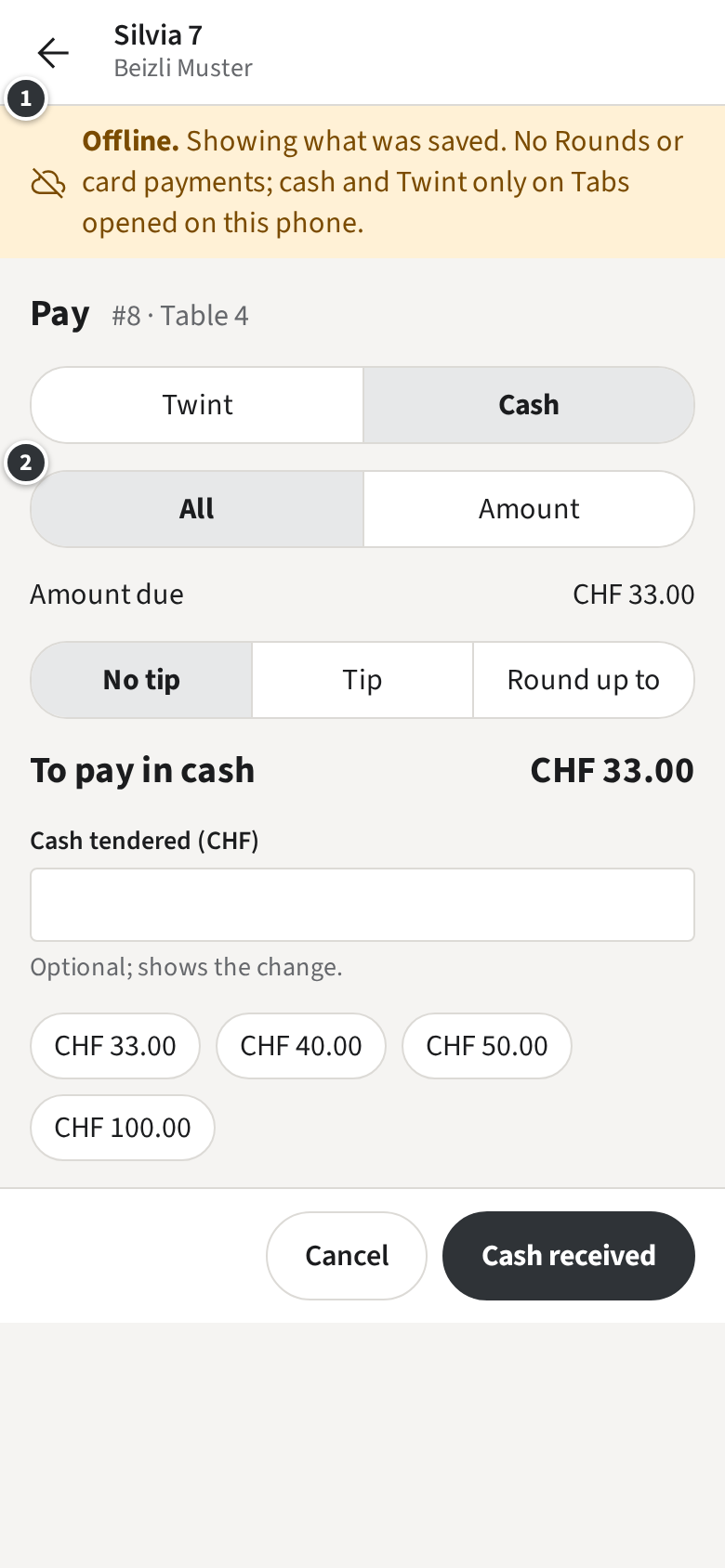
When the phone loses its connection, the staff app shows Offline. at the top ① and keeps showing the Rooms, the menu and the open Tabs as they were last loaded.
While offline:
- No Rounds: nothing can be sent to the Stations. Keep the items in the Draft and send them when the connection is back.
- No Card, no printing, no Voids or Discounts.
- Cash and Twint still work, for the whole amount or an amount ②, on Tabs opened on this phone that no other phone changed. Silvia opened Table 4 on her phone, so she can take its cash.
A Payment taken offline shows as Pending sync. Once the phone is online again and you are signed in, it is booked by itself. Until then it cannot be refunded or printed. Stay signed in until it is synced.
If the Tab changed elsewhere in the meantime, the Payment is not booked and the Tab shows Needs attention: a Manager sorts it out.
In a browser there is no working offline: the banner says nothing can be saved until the connection is back.