
Marking done and undoing
While you work through a Ticket, tap an item to tick it off: it is crossed out on a grey band. Tap it again to undo the tick. Ticks only help you keep track; they stay on this tablet, and nobody else sees them.
When the whole Ticket is ready, tap Done.
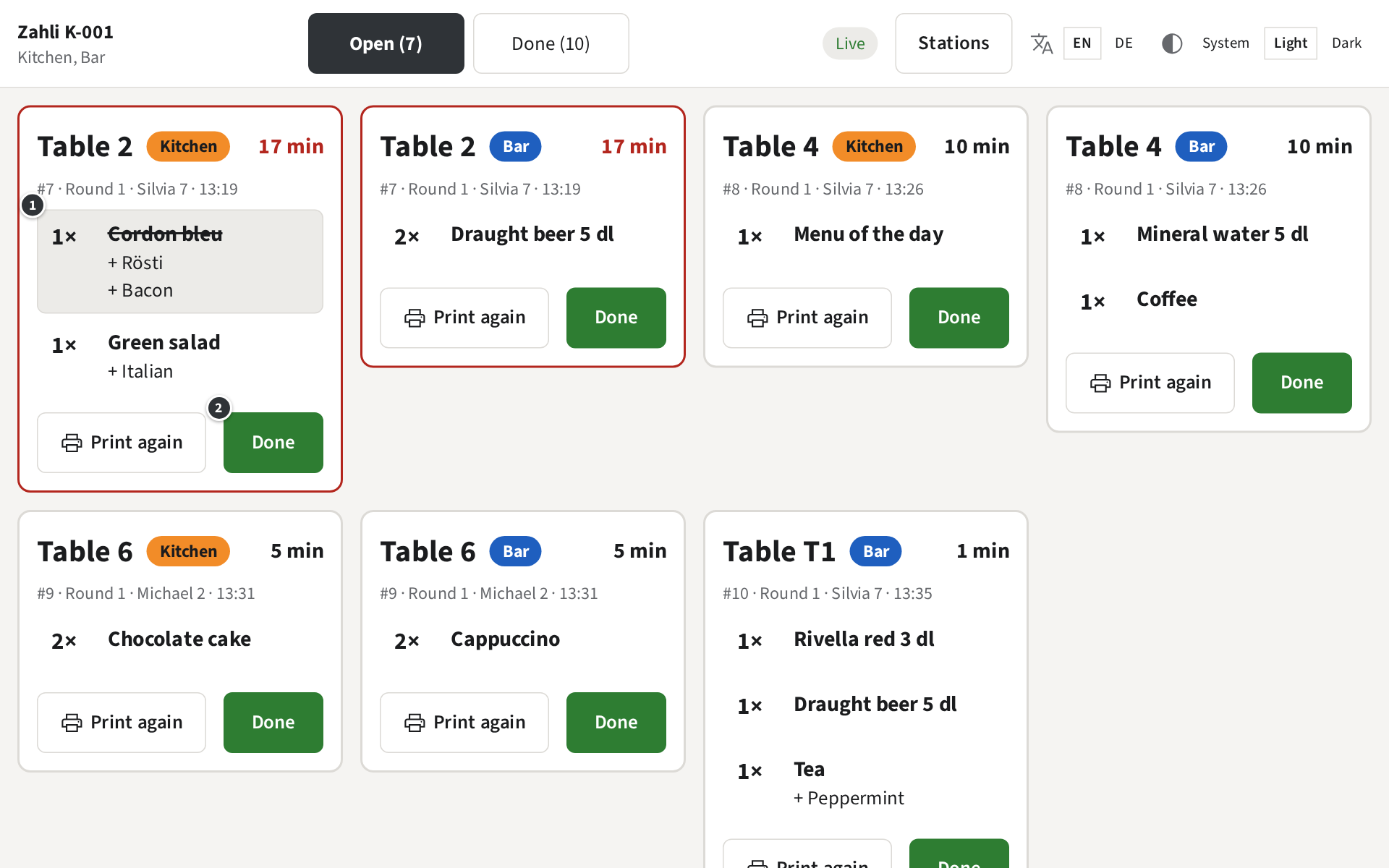
- ① the cordon bleu, ticked off.
- ② Done: the Ticket moves to the done Tickets, with the time it was done.
Once every Ticket of a Round is done, the Kitchen’s and the Bar’s, the Waiter who sent it gets a message in the staff app that the Round is ready. So tap Done when the plates go out, not before.
Example: Table 2 has a cordon bleu and a green salad. The cook ticks off the cordon bleu once it is in the pan, the salad once it is dressed, and taps Done when both are on the pass. The bar has already marked its beer done, so Silvia’s phone says that Table 2 is ready.
A Ticket marked done by mistake
Section titled “A Ticket marked done by mistake”A done Ticket cannot be made open again. It stays with the done Tickets for the day: tap Print again there to have it on paper again (Done Tickets), and tell the Waiter, who may have been told the Round is ready.
Without a connection
Section titled “Without a connection”Done works without the internet too: the Ticket moves to the done ones at once and says Waiting for the connection… until the tablet is connected again and sends it.