
Statistics and CSV
Today → Statistics shows the figures of live Tabs only: what was taken in test mode never counts.
Choose the days
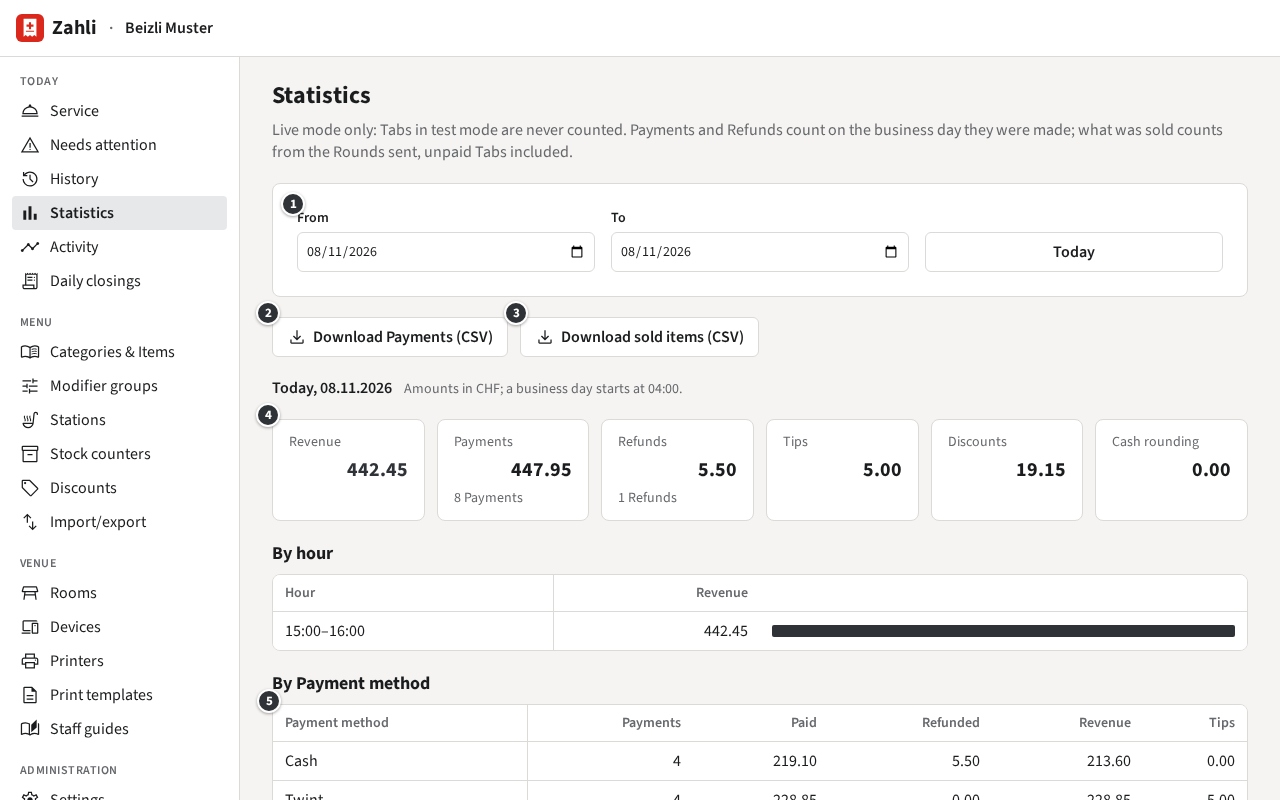
Section titled “Choose the days”① From and To pick a range of business days; the page opens on today’s, and Today goes back to it. A business day runs from the cut-off (04:00 unless the venue settings say otherwise) to the next, so a Payment at 01:30 still counts on the evening before.
What the figures mean
Section titled “What the figures mean”The tiles ④ add up the range:
- Revenue: what Payments took off their Tabs, less what Refunds gave back.
- Payments and Refunds: the money taken and given back, with how many.
- Tips and Cash rounding: taken on top, never revenue.
- Discounts: what Discounts took off the Tabs.
Below come the breakdowns: By business day (for more than one day), By hour, By Payment method ⑤ (a Refund counts under the method it was paid back by), By Category, By Item, By Staff member (the Rounds each sent, the Payments each took with their Tips, the Refunds each made) and Discounts given.
Payments and Refunds count on the business day they were made. What was sold, by Category and Item, counts from the Rounds sent, Tabs still open included; so its total is not the revenue.
Export as CSV
Section titled “Export as CSV”② Download Payments (CSV) downloads every Payment and Refund of the range, one per row, with business day, time, Receipt number, method, Payment provider, amount, Tip, rounding, Staff member and Table. ③ Download sold items (CSV) downloads every line of the Rounds sent, with Category, Item, Modifiers, quantity, units on the house, revenue and VAT rate. Both open in any spreadsheet; send the Payments file to your bookkeeping.
Example: after lunch Michael checks the day. Revenue is CHF 442.45: the Payments of CHF 447.95 less his Refund of CHF 5.50 for the warm Rivella. The CHF 5.00 in Tips, CHF 1.00 for Silvia and CHF 4.00 for himself under By Staff member, are not part of it. At the end of the month he sets From to the first and To to the last day and clicks Download Payments (CSV) for the bookkeeper.