
Audit log
Zahli records every change to the venue’s settings, staff, menu prices, Devices and Printers, and every money matter beyond a plain Payment, such as a Void, a Discount, a Correction or a Refund. The record is under Administration → Audit log, newest first. Entries are recorded automatically and can never be changed or deleted.
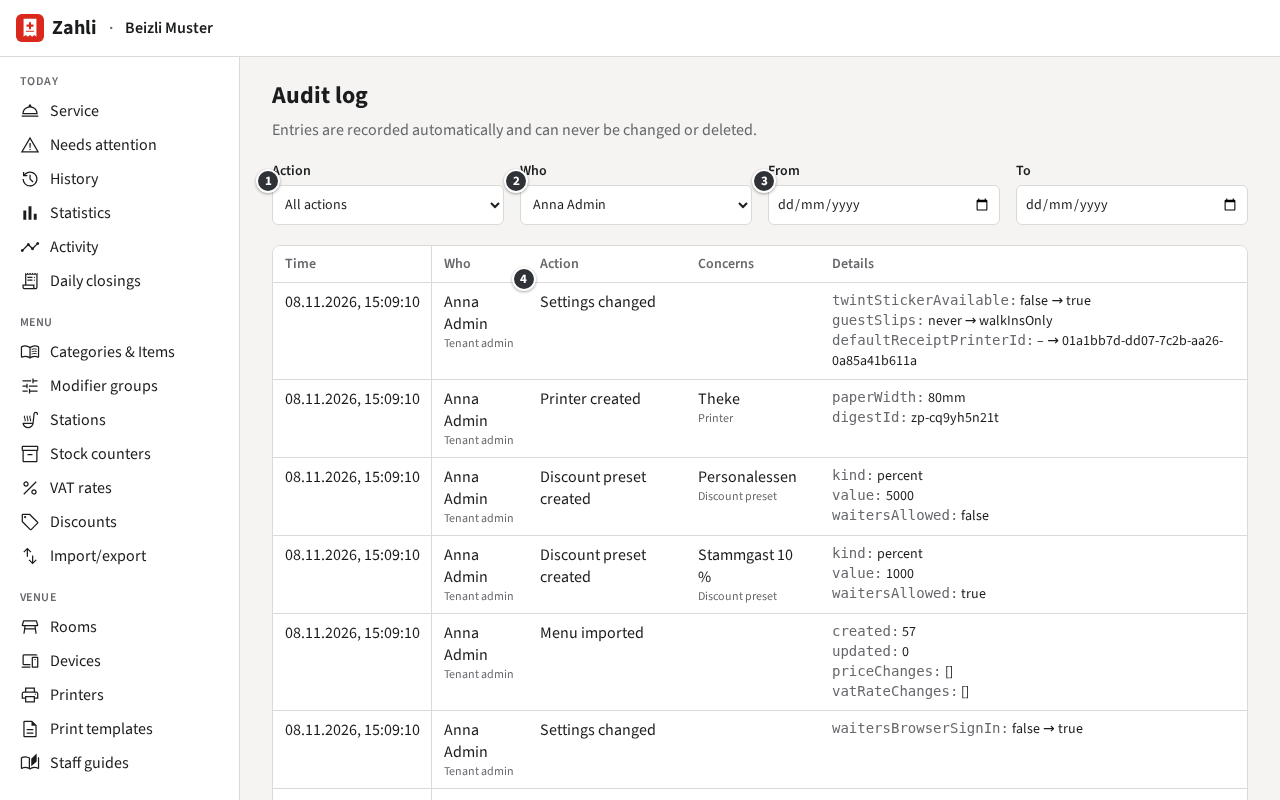
Each entry says:
- Time: when, to the second.
- Who: the Staff member, with their Role. Not signed in marks a failed sign-in; Global admin acting as Tenant admin marks a Global admin of Zahli who acted as your Tenant admin, for instance while helping you set up.
- ④ Action: what happened, such as Settings changed or Payment refunded.
- Concerns: the Staff member, Device, Item or Tab it was about.
- Details: what changed, as the value before → after, or the amounts and reasons.
Find an entry
Section titled “Find an entry”Narrow the list with the filters at the top; they combine:
- ① Action: one kind of change.
- ② Who: one Staff member.
- ③ From and To: a range of days.
Show older entries at the foot loads earlier entries.
Example: on Monday the staff app opens with the menu instead of the Tables. Anna chooses Settings changed under Action and sees that Michael changed After sign-in the staff app shows on Saturday for the village fair; she asks him to switch it back. Later she checks who refunded the Rivella at lunch: under Action Payment refunded, the entry shows Michael, CHF 5.50 in cash and his reason “Rivella war warm”.
What it does not show
Section titled “What it does not show”The plain course of service, Tabs opened, Rounds sent and Payments taken, is not in the Audit log: see it in the History and the Activity. The Audit log cannot be exported or cleared.