
Correcting your own Payment
This guide shows what applies to your venue.Show everything
Once a Tab is paid, its items can no longer be voided. If something was wrong, you correct the items and give the money back. You can do this for Payments you took yourself, on the same business day; anything else a Manager does.
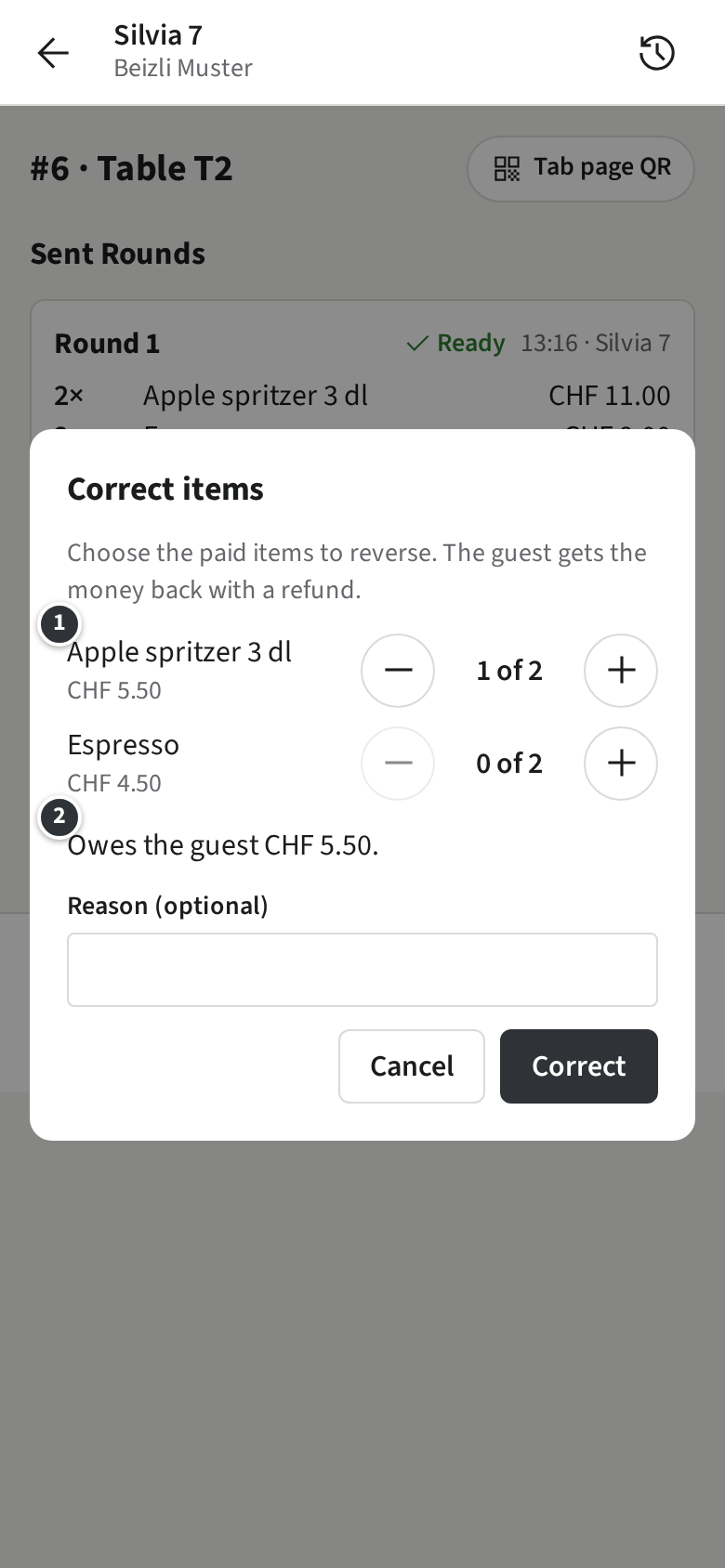
Example: Table T2 on the Terrasse paid CHF 21.00 by Twint, but one apple spritzer never came.
- Open the Tab, for example from the History, and tap Correct items.
- Pick the items to take back ①: one apple spritzer. ② shows what the guest gets back: CHF 5.50.
- Add a reason if it helps and tap Correct.
The refund opens by itself on your Payment, with the amount filled in. Then:
- For Cash, hand the money back and tap Refund.
- For Twint, send the refund in the Twint Business app first, then tap Refund.
- For Card, tap Refund: the money goes back to the card.
The Tab shows the correction and the refund, each with its own Receipt number. If your Payment cannot cover it, the staff app tells you to ask a Manager.