
Stock counters
A Stock counter counts something the venue can run out of, such as Beizli Muster’s chocolate cake or its menu of the day. Each unit ordered of an Item or Modifier that draws from it takes one unit when the Round is sent; a Void or a correction gives it back. The counters are under Menu → Stock counters.
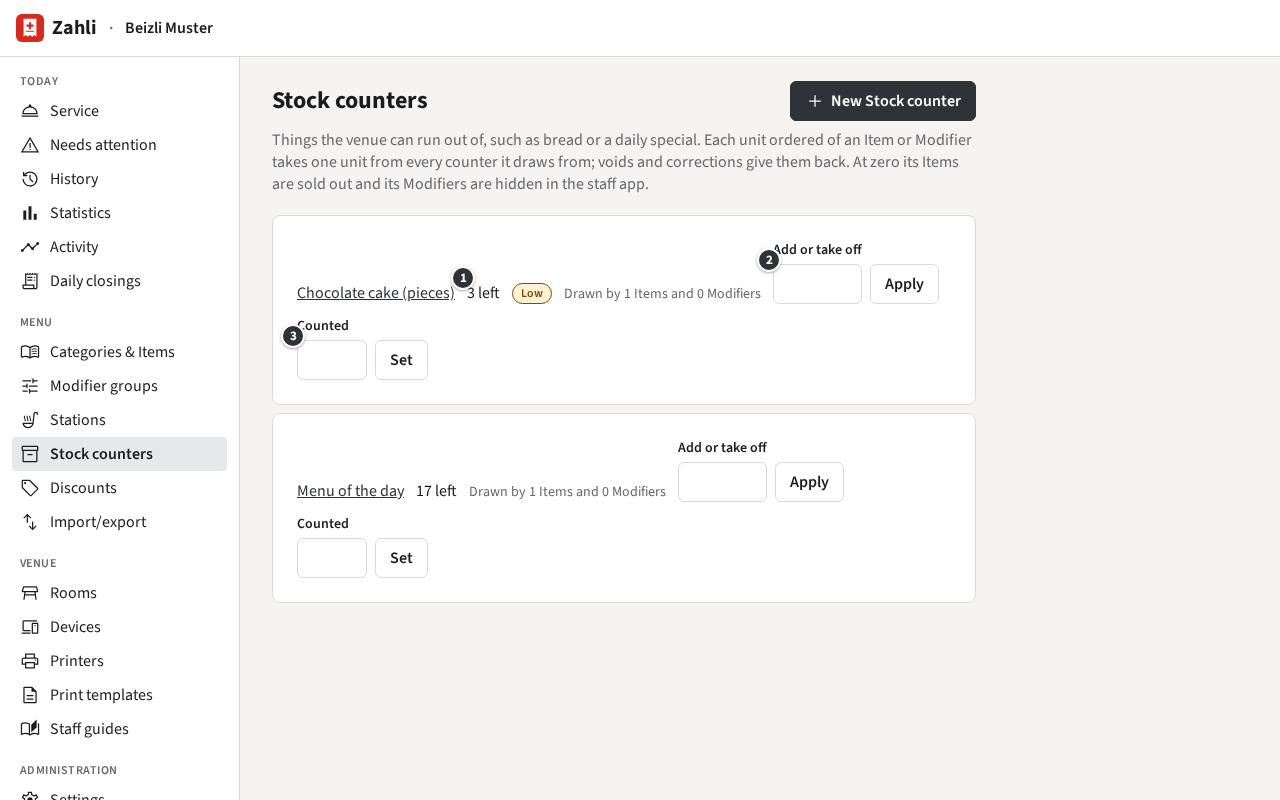
- ① how many are left; Low once few are left, None left at zero.
- ② Add or take off adds units to what is there, or takes them off.
- ③ Counted replaces it with what you counted.
Create a counter
Section titled “Create a counter”- Click New Stock counter.
- Enter the name and the Units there are now.
- Under Show what is left from, enter from how many on the staff app shows what is left.
- Tick the Items that draw from it and the Modifiers that draw from it, and click Create.
Example: in the morning the Beizli bakes five pieces of chocolate cake. Its counter Chocolate cake (pieces) starts at 5, shows what is left from 3, and the Item Chocolate cake draws from it. After two pieces for Table 6, the staff app’s tile says 3 left (Sold out).
One counter can serve several Items and Modifiers: a counter Rösti (portions) could be drawn by the Zurich-style veal with rösti and by the Modifier Rösti of the sides. A unit ordered takes one unit, also when the Item and its Modifier both draw from the same counter.
Click a counter’s name to change its name, where it shows what is left from, or what draws from it. Remove Stock counter, at the bottom, stops its Items and Modifiers from drawing from it.
Refill or count
Section titled “Refill or count”During service, add what comes in: enter the number under ② and click Apply. A negative number takes units off, such as -1 for a piece that fell on the floor; taking off more than is left is refused. Units ordered meanwhile still count, so adding is safe while the Waiters keep ordering.
To set what is really there, enter it under ③ and click Set, best when nobody is ordering.
Example: at three in the afternoon, Michael brings another cake of 12 pieces: he enters 12 and clicks Apply, and 3 left becomes 15. At closing he counts 4 pieces where the counter says 5: he enters 4 under Counted and clicks Set.
At zero
Section titled “At zero”When a counter reaches zero, its Items are sold out in the staff app and its Modifiers are no longer offered. A Round that would take more than is left is not sent; the Waiter sees which item ran out. Under Menu → Categories & Items such an Item shows Out of stock.
As soon as you add units, they can be ordered again by themselves: the counter does not tick Sold out, so there is nothing to untick.