
Security settings
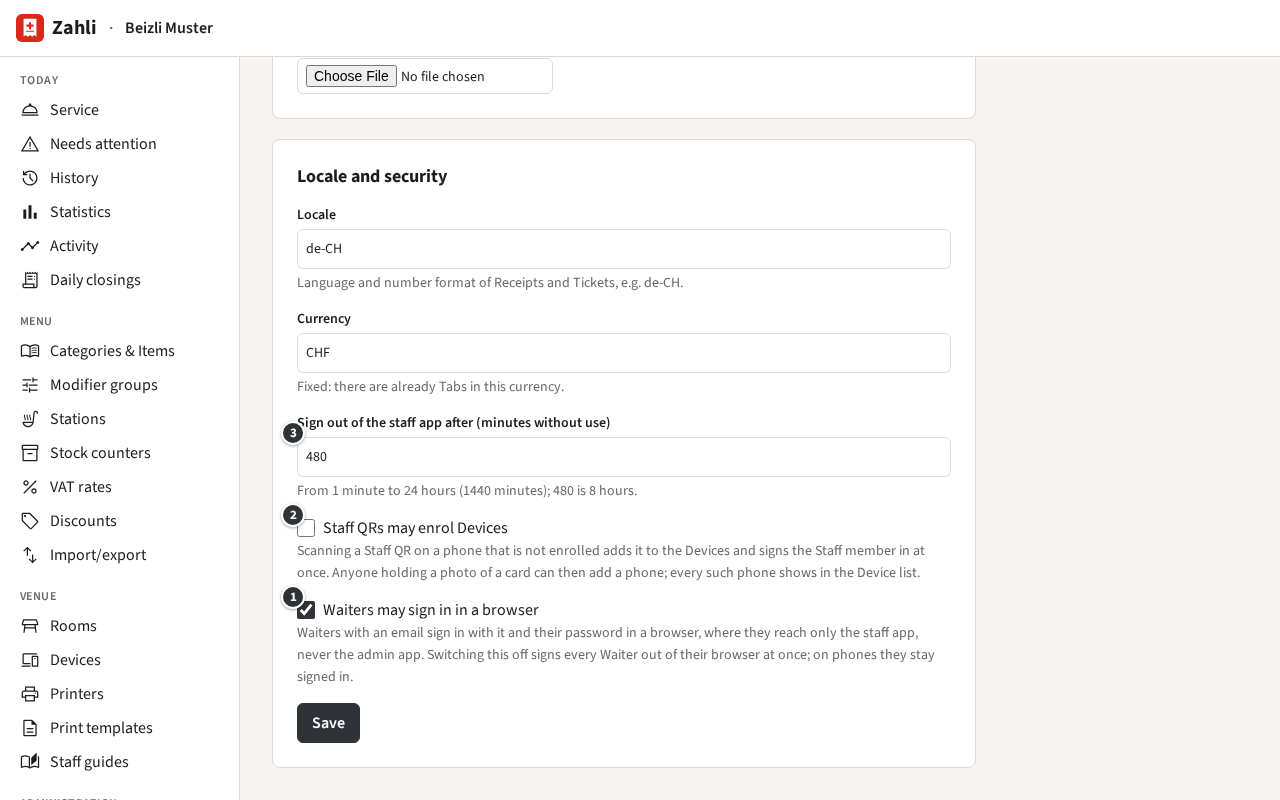
Three settings decide how easily people get in. They are in the card Locale and security under Administration → Settings; a Manager sees them there but cannot change them. Change what you need and click Save at the end of the card.
Waiters in a browser
Section titled “Waiters in a browser”① Waiters may sign in in a browser (off at first) lets Waiters who have an email sign in with it and their password in a browser, on a laptop or tablet. There they reach only the staff app, never the admin app. Managers and Tenant admins can always sign in in a browser.
Switching it off signs every Waiter out of their browser at once; on the venue’s phones they stay signed in. Which Waiters can sign in this way shows on the list of Staff members.
Example: Beizli Muster has a laptop at the counter for Walk-ins, so Anna has switched it on, and
Silvia signs in there with silvia@beizli-muster.ch.
Staff QRs that add phones
Section titled “Staff QRs that add phones”Normally a phone joins the venue’s Devices only by a one-time code from the admin app (Devices). With ② Staff QRs may enrol Devices (off at first), scanning a Staff QR on a phone that is not enrolled yet enrols it and signs the Staff member in, in one step. The phone is then called after its model and the person’s first name, such as “Pixel 8 – Silvia”. A kitchen terminal is always enrolled by code.
This is handy when staff bring their own phones, but anyone holding a Staff QR card, or a photo of one, can then add a phone to the venue. So if you switch it on:
- look at Venue → Devices now and then, and deactivate or remove phones you do not know; every enrolment is also in the Audit log;
- print a new Staff QR for anyone who lost theirs; that stops the old card at once.
Example: Beizli Muster’s phones are its own and set up by Michael, so the setting stays off.
Signing out after idle time
Section titled “Signing out after idle time”③ Sign out of the staff app after (minutes without use) signs a Staff member out of the staff app on a phone once it has not been used for that long: from 1 to 1440 minutes (24 hours), 480 (8 hours) at first. Each use starts the count again. It does not apply in a browser, where a session ends at signing out or 12 hours after signing in.
Choose it so a shift with quiet hours does not sign anyone out, but a phone left on the counter overnight does. Example: Beizli Muster keeps 480: Silvia stays signed in through lunch and the afternoon break, and the phones are signed out by the next morning.