
Staff guides
Under Venue → Staff guides you hand your staff the guide they need: the Waiter guide to the Waiters, the Kitchen guide to whoever works at the kitchen terminal, this guide to another Manager.
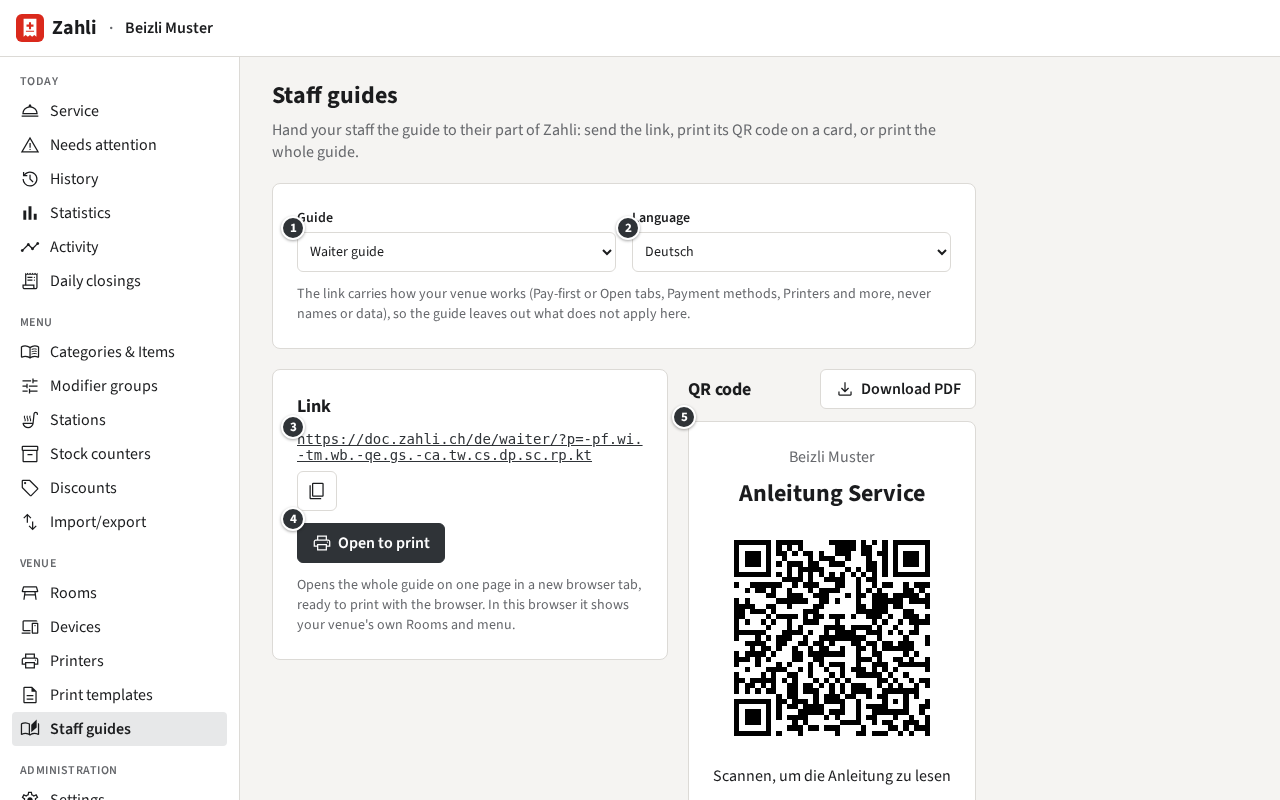
- ① Guide: Waiter guide, Kitchen guide, Manager guide or Tenant admin guide.
- ② Language: Deutsch or English; at first your venue’s language.
- ③ The link, to send by message or email. The button beside it copies it.
- ④ Open to print opens the whole guide on one page in a new browser tab. Print it there with the browser’s Print (Ctrl+P), on paper or as a PDF.
- ⑤ The QR code on a card: Download PDF makes a PDF of it to print, cut out and lay by the till or pin up in the kitchen. A phone scanning it opens the guide.
Fitted to your venue
Section titled “Fitted to your venue”The Waiter guide’s link carries how your venue works: Pay-first or Open tabs, Walk-ins, the Payment methods, Discount presets for Waiters, Stock counters, a receipt Printer, a kitchen terminal and a few settings more. Opened through it, the Waiter guide leaves out what does not apply to you, so a Waiter at a venue without Card never reads about Card. The link holds only these switches, never names or data. The other guides are the same for every venue.
The link follows your settings as they are when you open the page. Once you change them, for example with a kitchen terminal or Card added, open the page again, hand out the new link and print a new card.
Example: Beizli Muster takes Open tabs, Cash and Twint, prints Receipts on Theke and has the kitchen terminal K-001. Michael picks Waiter guide in Deutsch, clicks Download PDF and lays the card by the till. Silvia scans it with her phone and reads the Waiter guide without the passages on Pay-first and Card.
Your own Rooms and menu
Section titled “Your own Rooms and menu”Opened in a browser where you or one of your staff are signed in to Zahli, the Waiter guide shows your venue’s own screens in place of Beizli Muster’s: each of your Rooms, your menu, the choices of your first item with Modifiers, and an example Tab of your first three items with its Pay sheet. That Tab exists only on the page; nothing is sent or booked. Printed from there, the guide is a picture of your venue at that moment, open Tabs included, so print it before service. Where nobody is signed in, as on most phones scanning the card, it shows Beizli Muster’s screens.
Example: Michael clicks Open to print before opening time and prints the Waiter guide with the Gaststube, the Terrasse and the menu of Beizli Muster as they are today.