
Service and Needs attention
Serve from the admin app
Section titled “Serve from the admin app”Today → Service opens the staff app in a browser tab of its own. You serve there as the Waiter guide describes, with a few things more:
- Free-form Discounts, Corrections and Refunds on any Tab, not only your own.
- In Settings, the Receipt printer of this browser, where Receipts printed here go (at Beizli Muster the venue’s Printer Theke), and test mode.
In a browser there is no Card and no working offline.
Needs attention
Section titled “Needs attention”When a staff phone loses its network, Waiters can still take cash and Twint on Tabs opened on that phone (see Working offline). Back online, the phone books each such Payment, unless the Tab changed meanwhile. Then the guest has paid, but nothing is paid on the Tab. Zahli keeps the Payment aside for a Manager: the Tab shows Needs attention in the staff app, and the Payment is listed under Today → Needs attention, the page the admin app opens after you sign in.
Example: on Table 4, Silvia’s phone had no network. She took CHF 33.00 in cash for the menu of the day, the mineral water and the coffee. Meanwhile Michael added a second coffee from his browser, so when the phone synced, the Tab came to CHF 37.50 and the cash was not booked.
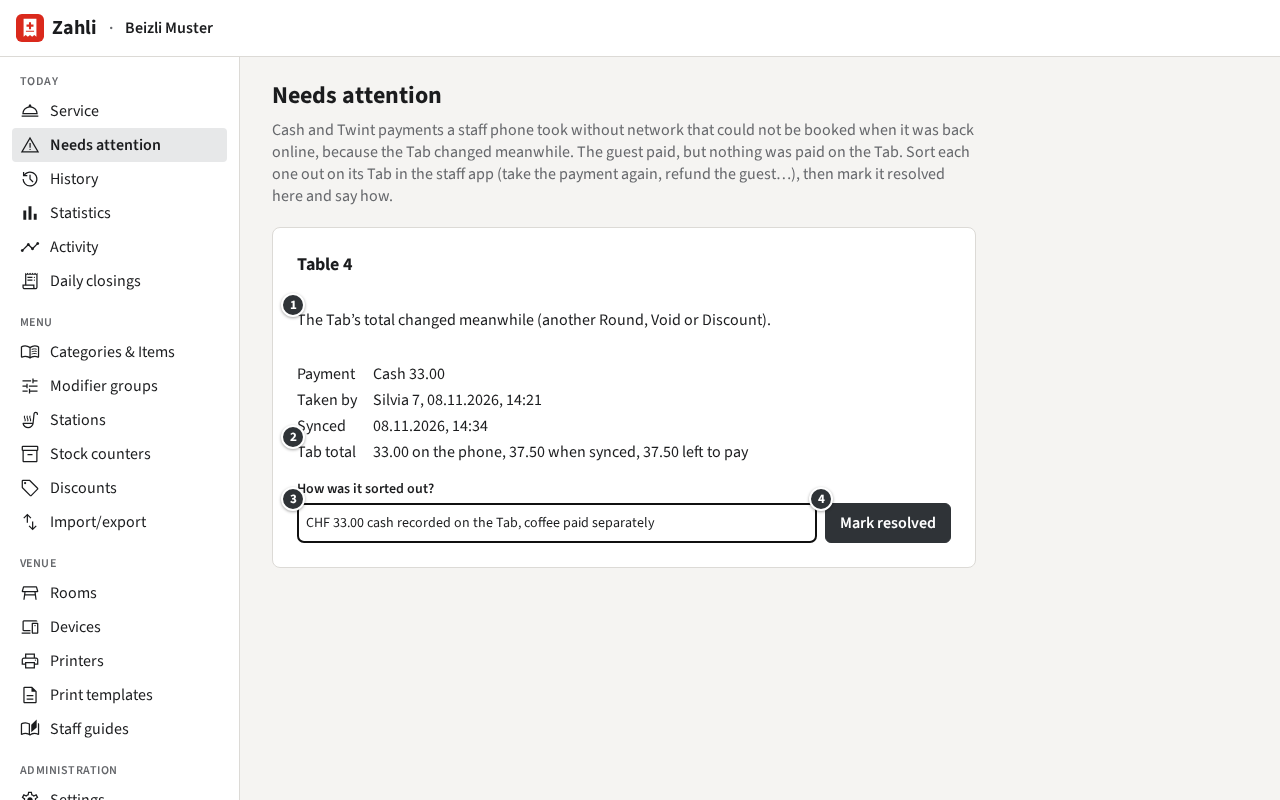
① says why the Payment was not booked; ② what the Tab came to on the phone and when it synced, and what is left to pay. To sort it out:
- Open the Tab in the staff app and put it right with what you know: here, take the CHF 33.00 again as a cash Payment, since Silvia has the money, and let the guest pay the second coffee. If the guest paid twice, refund the difference.
- Back under Needs attention, write how you sorted it out ③ and click Mark resolved ④.
The entry leaves the list, and the Tab no longer shows it. Look at Needs attention every day before the Daily closing: the cash in the drawer includes these Payments.