
Venue settings
How the venue works for everyone is set under Administration → Settings. A Manager changes the card Service, and switches the whole venue between test and live mode in the card above it (Test mode).
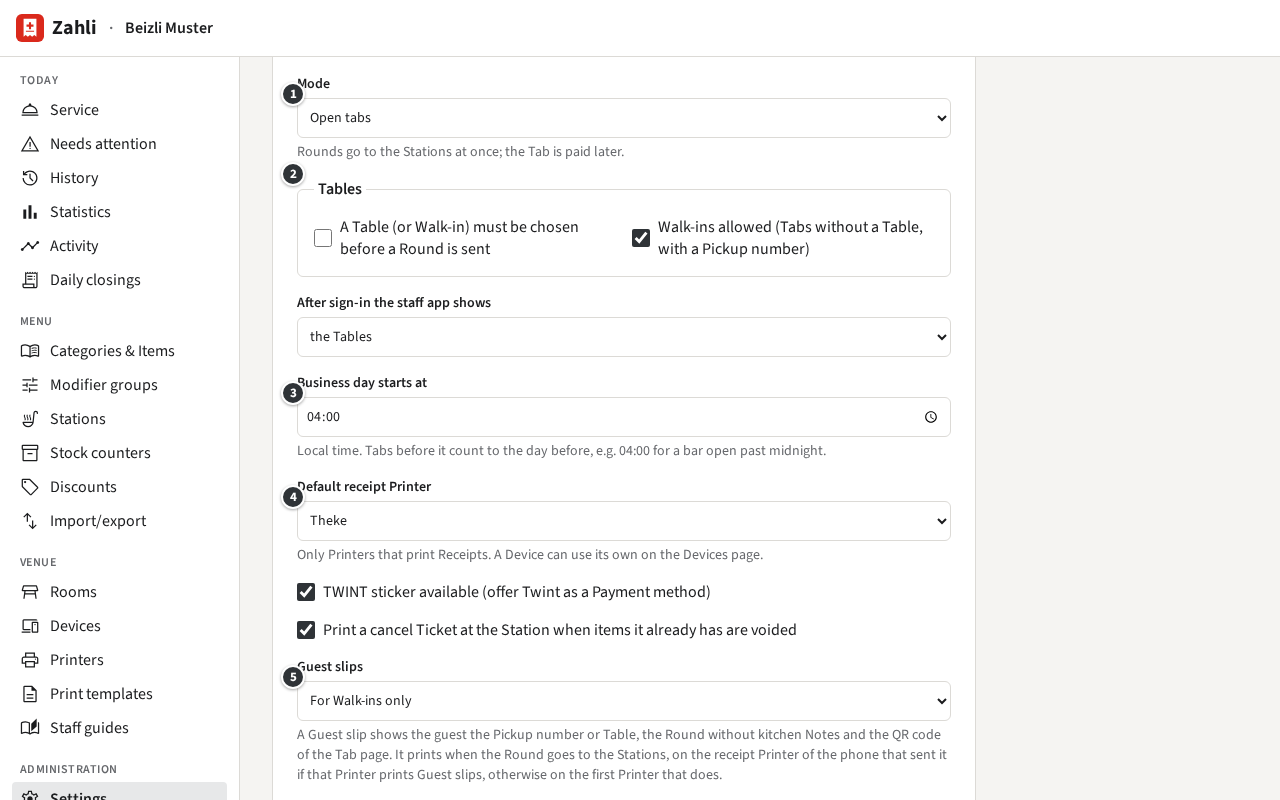
The Service card
Section titled “The Service card”- ① Mode: Open tabs, where Rounds go to the Stations at once and the Tab is paid later, or Pay-first, where a Round goes to the Stations only once the Tab is paid (Pay-first).
- ② Tables: whether a Table (or a Walk-in) must be chosen before a Round is sent, and whether Walk-ins, Tabs without a Table, are allowed.
- After sign-in the staff app shows: the Tables, or the menu, for a new Tab; the latter suits a counter where guests order and pay at once.
- ③ Business day starts at: when one business day ends and the next begins, in local time. Tabs before it count to the day before, in the History and the Daily closing.
- ④ Default receipt Printer: where Receipts print unless a phone has its own (Printers).
- TWINT sticker available (offer Twint as a Payment method): offers Twint at the Pay sheet.
- Print a cancel Ticket at the Station when items it already has are voided: after a Void, the Station gets a cancel Ticket for what it already had.
- ⑤ Guest slips: Never, For Walk-ins only, Always, or QR code on the kitchen Ticket instead. A Guest slip gives the guest their Pickup number or Table, the Round, and the QR code of the Tab page. It needs a Printer with Prints Guest slips.
Click Save at the end of the card. The staff app takes the change at its next sign-in or refresh.
Example: Beizli Muster’s business day starts at 04:00, so a round of drinks at half past midnight still belongs to the evening before and its Daily closing. Walk-ins are allowed, and only they get a Guest slip with their Pickup number, printed at the Theke. For a summer festival, Michael would switch the Mode to Pay-first, let the staff app open with the menu, for a new Tab, and switch both back afterwards.
What the Tenant admin sets
Section titled “What the Tenant admin sets”Further down, the cards Twint code (the venue’s Twint QR code shown on the phones) and Locale and security (language and currency of the prints, sign-out after idle time, Staff QRs enrolling phones, Waiters in a browser) say Only a Tenant admin can change these. You see them, greyed or without buttons, but cannot change them. At Beizli Muster, Anna does (Tenant admin guide).