
Menu import and export
Under Menu → Import/export, the whole menu travels as one JSON file: to keep a copy before big changes, to change many prices at once in a text editor, or to copy the menu to another venue. The Rooms have their own file, on the Rooms page (Rooms).
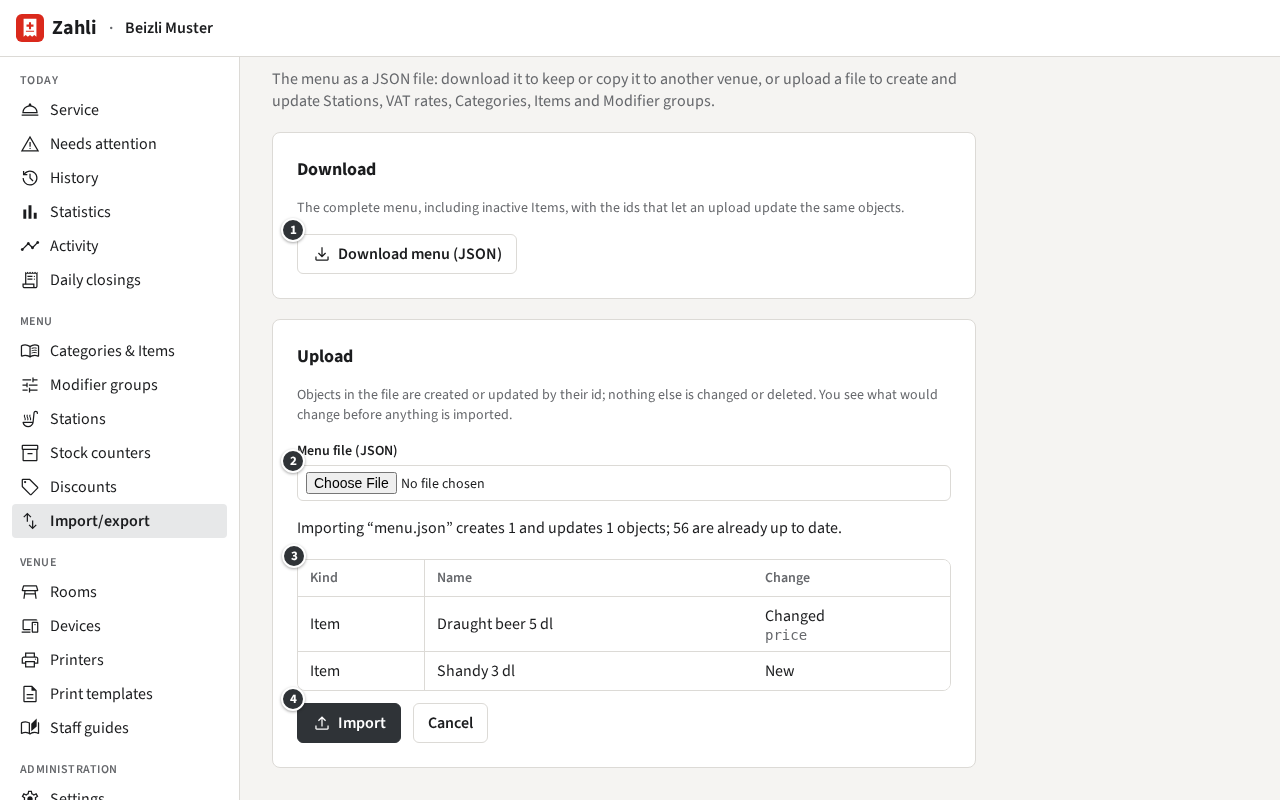
Download the menu
Section titled “Download the menu”Click ① Download menu (JSON). You get menu.json: the Stations with their colours, the VAT
rates, the Categories with their Items (also those off the menu), and the Modifier groups with
their Follow-up groups, each with its id. Stock counters and Discount presets are not in it.
Pictures are only named: in the same venue they stay, in another one the Items have none until you
add them again.
Upload a file
Section titled “Upload a file”- Choose the file under ② Menu file (JSON).
- Zahli checks it and shows what importing it would change ③, without changing anything yet: each Station, Category, Item or Modifier group it would create (New) or change (Changed, with the fields), and how many are already up to date.
- Click ④ Import to import it, or Cancel.
Example: Michael raises the draught beer from 7.50 to 8.00 and adds a Shandy 3 dl to the Cold drinks in the downloaded file, then uploads it. The page shows one Item to create and one to change, its price; everything else is up to date. He clicks Import.
What the file contains is created or updated by its id; what it leaves out stays as it is, and nothing is ever deleted. The order of things in the file becomes their order on the menu. A file that breaks a rule, such as prices in another currency or a Follow-up group that would open itself, is not imported; the page lists each problem with where it is in the file.
A file that creates or changes VAT rates is refused with This file creates or changes VAT rates, which only a Tenant admin may do. Ask a Tenant admin to import it, or leave the VAT rates as they are.
Copy a menu to another venue
Section titled “Copy a menu to another venue”Download the menu in one venue and upload the file in the other, which must use the same currency. Since the ids stay the same, uploading a newer file later updates the copies instead of adding new ones.
The first copy brings the first venue’s VAT rates along as new ones, so a Tenant admin imports it; later files, with the same rates unchanged, a Manager can import too.
Example: Beizli Muster opens a summer kiosk at the lake as a venue of its own. Michael downloads the menu, Anna Admin uploads it in the kiosk, and Michael takes the hot meals off the menu there.
A later upload sets everything the file names as the file has it, also what was changed in the copy since: uploaded again, the Beizli’s file would put the kiosk’s hot meals back on its menu.
The menu is the same in test and live mode, so there is nothing to copy between them.