
History
This guide shows what applies to your venue.Show everything
The History lists your Rounds and Payments of a business day, the latest first, and every Tab closed that day. Open it with the clock icon at the top right of the staff app.
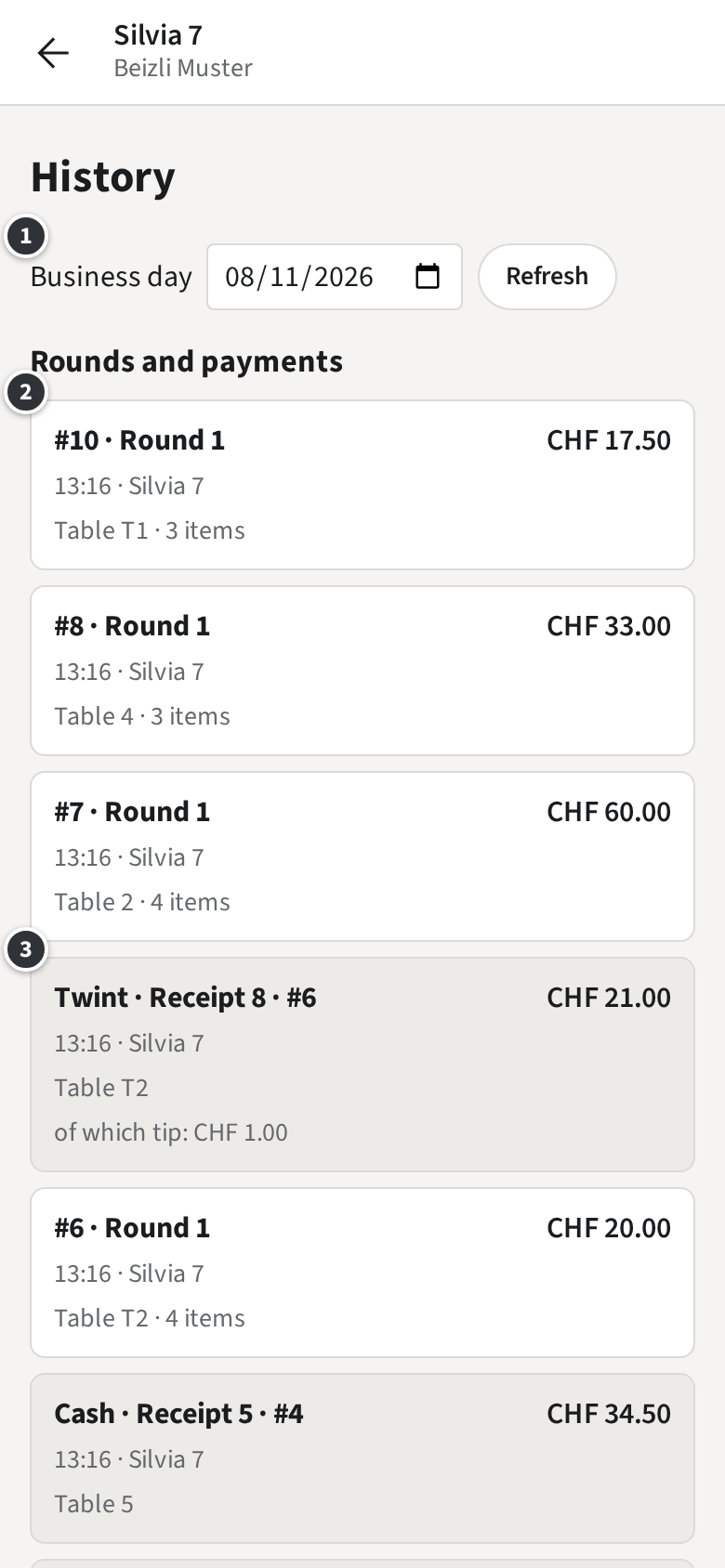
- ① picks another day; Back to today comes back.
- A Round ② reads #7 · Round 1: the Tab number, then the Round, with its place and number of items.
- A Payment ③ reads Twint · Receipt 8 · #6, with the Tip and any refund.
- Below, Closed Tabs lists the day’s closed Tabs by Table, the Walk-ins last.
Tap an entry to open its Tab. A Payment opens with that Payment highlighted, where you print its Receipt or correct it.
Example: a guest of Table T2 comes back for a Receipt. Silvia opens the History, taps Twint · Receipt 8 · #6 and prints the Receipt from the Tab.